BingX Partner Hub User Guide (New)

2025-06-20 10:56
Welcome aboard as a BingX partner! Your continuous trust and support mean a lot to us.
For your convenience in managing partnership data and settings, BingX has created a dedicated management platform for partners. This dashboard provides transparent information and clear transaction details. The following guide will help you quickly understand how to use the management platform and its key features, enhancing your overall user experience.
| 1. Features | |
| 2. Common Terms | |
| 3. User Guide | |
| 4. FAQs |
4.1 How to check users' deposits and withdrawals? 4.3 How to check users' related information? |
| 5. Same-Level Partner Commissions | |
1. Features
The BingX User Management Platform is designed for partners with a commission ratio of > 10%. It offers a range of self-service statistics and management tools. Through the platform, you can:
- Quickly access platform event information, ensuring you never miss a chance to participate and earn rewards.
- Access your referrals' user data, transaction volumes, and commission insights to evaluate promotional performance and understand your business profits.
- Manage and query user deposits and withdrawals to ensure transparent fund flows and enhance fund utilization efficiency.
- Keep track of referrals' trading activities to quickly capture market movements.
- Effectively manage partners and review key performance data to enhance team collaboration.
2. Common Terms
2.1 Direct Referrals and Indirect Referrals
Let's assume the commission ratio and referral relationship are as shown in the diagram, where A --> B represents A referred B:
- Direct Referral: Users who were directly referred by User A, having a relationship tier of 1, such as User B, User C, and User D. These users have a direct relationship with User A, with no intermediaries involved.
- Indirect Referral: Users who were referred by User A's direct referrals, placing them at a relationship tier of 2. For instance, if A refers B, and B refers E, then E is an indirect referral of User A.
In summary, direct referrals are first-tier relationships, while indirect referrals are second-tier relationship.
2.2 Commission
When your referees trade and generate trading fees, you earn a commission based on a percentage of the trading fees. The commission will be in the same currency as the trading fees generated by your referees.
For example, if your referee generates a trading fee of 10 EOS, you may receive a commission of 5 EOS. In the User Management Platform, the Commission (USDT) represents an estimated value of all commissions converted to USDT using the current exchange rate. However, the actual commission will be paid in the same currency as the trading fee.
Visit "Distribution Details" to view detailed commission payouts.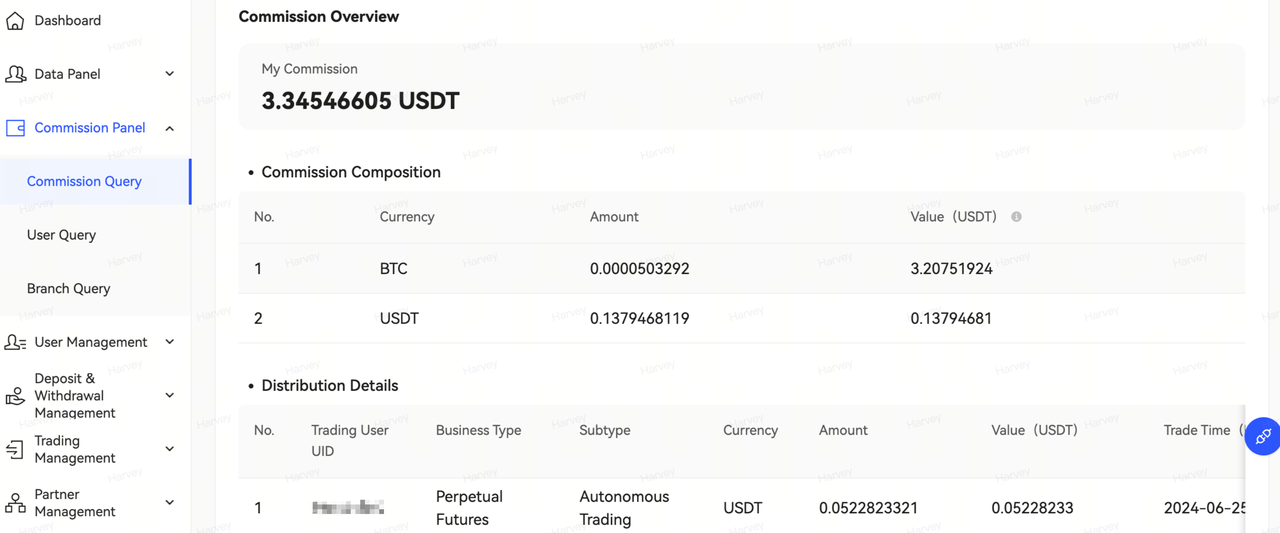
2.3 Partner
Users with an LV2 level or higher are recognized for their ability to attract new users and are therefore designated as "Partners".
2.4 Branch
- Branches under this partner: All referees (direct referees + indirect referees) of a partner are collectively referred to as the partner's branch. The partner's own data is excluded in the statistics.
- All direct referees: All users directly referred by a partner are grouped to create a "branch".
Let's assume the commission ratio and referral relationship are as shown in the diagram, where A --> B represents A referred B: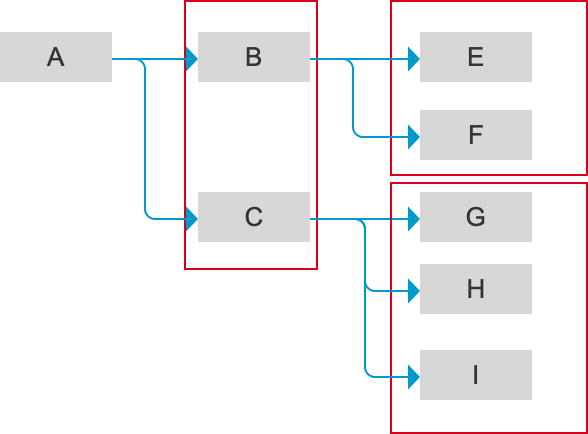
As shown in the figure above:
- B and C are "all direct referees" of A.
- E and F are "branches under partner B".
- G, H and I are "branches under partner C".
- The trading volume of "branches under partner B" refers to the total trading volume of E and F.
- The trading fees generated by "branches under partner B" will contribute commissions to both B and A.
3. User Guide
3.1 Dashboard
The Dashboard serves as a collection of data and information. It allows you to view core metrics and personal information, get an overview of your referrals and trading volume, set flexible query times, and more.
- Data Overview: Check historical data conveniently, such as the number of your direct/indirect referees, first-trade users, trading volume, commission, and more.
-
Referral Link:
- The "Referral Code" and "Referral Link" columns shows your customized referral codes with benefits and the official default referral link. You can copy and use them directly.
- The 'Benefit | Ratio" column displays the type of benefits and rebate ratios you have set for your friends. Click "More" to enter your "Refer Friends" page. Click "Manage benefits" - "Add Benefits for Referees" to set them according to your preferences. The rebate ratio for your friends will be adjusted on the basis of your commission ratio.
- Announcement and Commission Ratio: Stay informed on the latest announcements of the User Management platform and the details of your account's commission ratio.
- Data Trend Overview: Filter by statistical period to view historical trends in trading volumes, commissions, deposits, total traders, referrals, first-trade users, and more.
- User Ranking/Branch Ranking: Filter by statistics time and referral type to quickly view rankings for all users and branches based on trading volume, commission, net deposit, total deposit, and more.
- Recent Signed-Up Users: Get a quick overview of recently signed-up users you have directly or indirectly referred.
3.2 Data Panel
(The data of this section is mainly generated based on your overall referees.)
- Referral Statistics: Filter by referral time to view the number of your direct and indirect referees. Click "Export" in the bottom right corner to export the detailed statistics.
- First-Trade Users: Filter by statistical period to view the number of direct and indirect referees who completed their first trade. Click "Export" in the bottom right corner to export the detailed statistics.
- Definition of First-Trade Users: The number of users who have deposited funds and completed their first trade within the statistical period.
- Deposit & Withdrawal Data: Filter by statistical period to view the deposit amounts of direct and indirect referees. Click "Export" in the bottom right corner to export the detailed statistics.
-
Trade & Commission
- Filter by business type or time to quickly query detailed data on trading volume, total traders and commission.
- Quickly view the ratio of trading volume and commission for each product through the visual chart. Learn the top 10 trading pairs, total traders and trading volume proportion in Perpetual Futures or Standard Futures. Click "Export" in the bottom right corner to export the detailed statistics.
3.3 Commission Details
-
Commission Query: Filter by trading user UID, trade time, business type and currency to get an overview of your commission information.
- Commission Composition: Includes information on settlement currency, amount, value, etc.
- Distribution Details: Includes information on trading user UID, business type, subtype, currency, amount, value, trade time, issuance time, etc.
-
User Query: View the commissions and trading data of your direct and indirect referees, quickly accessing their trading volume.
- The top row of the list displays a summary of key data for a specific direct or indirect referee.
- By clicking the "Details" button at the end of each row, you can view detailed information about the user's payable trading fees and settlement coin.
- Branch Query: This section allows you to view the performance of partners under your direct referral in developing their own referral relationships.
Data Description
- Trading Volume: The trading volume generated by branches (excluding the branch owner's data).
- Your Commission: The commission allocated to you, generated from the trading fees of your branches.
- Branch Commission Statistics: Displays the total trading volume and commission data of all branches (including partner branch and direct referee branch) within a certain period of time.
- Branch under this partner: All referees (direct referees + indirect referees) of a partner are collectively referred to as the partner's branch. The partner's own data is excluded in the statistics.
- All direct referees: All users directly referred by a partner are grouped to create a "branch".
3.4 User Management
- Users' Basic Information: View the detailed information of your specified user.
- User Benefit Management: Set up benefits for users in batches.
3.5 Deposit & Withdrawal Management
- Deposit & Withdrawal Query: Look up the deposit and withdrawal information of specified users.
3.6 Trading Management
- Perpetual Futures Trading Query: Inquire the specified user's Perpetual Futures trading details by filtering through UID, currency, statistics time, futures type, or order number. (Order data is retained for one month, with a 1-hour data synchronization delay for the latest orders.)
- Standard Futures Trading Query: You can inquire the specified user's Standard Futures trading details by filtering through UID, currency, trading pair, statistics time, open type, or order number. (Order data is retained for one month, with a 1-hour data synchronization delay for the latest orders.)
- Spot Trading Query: Inquire the specified user's Spot trading details by filtering through UID, trading pair, side, statistics time, or order number. (Order data is retained for one month, with a 1-hour data synchronization delay for the latest orders.)
3.7 Partner Management
- Partner List: You can search for related information of referees with a referral level of LV2 or higher.
-
Partner Data: You can search for related information of referees with a referral level of LV2 or higher.
- "Partner's Basic Information" displays basic information of your partner, including UID/nickname, email/phone number, remarks, referrer UID, referral type, language, commission ratio, signed up time, etc.
- "Branch Size" shows the total number of referees in the designated branch, total KYC users, total depositors, total trading users (excluding trades using VST and Bonus), and partners (referees of ≥ LV2).
-
"Branch Statistics" provides information for the designated branch within a specified time range:
- Trade & Commission Data includes the total traders, branch deposits, branch trading volume, partner's total commission, etc.
- Referral Statistics includes the number of new referees, users who have deposited, users who have traded, etc.
- Statistics Time: The statistical period when data of Branch Deposits, Branch Trading Users, and Branch Trading Vol. are counted.
- Upper-level Partner UID: The UID of the user's immediate direct referrer in the referral hierarchy, who is also a partner.
-
New Referees/Deposited/Traded:
- "New Referees" refers to the number of new referees the partner has referred within the statistical period.
- "Deposited" refers to the number of referees who have made deposits within the statistics time. In some cases, the number of "Deposited" referees may be greater than the number of "New Referees". This is mainly because this data represents the total number of depositing users within the statistical period, including those who were referred previously but deposited within this time frame.
- "Traded" refers to the number of referees who have made their first trade within the statistics time. In some cases, the number of "Traded" referees may be greater than the number of "New Referees". This is mainly because this data represents the total number of users who have made their first trade within the statistical period, including those who were referred previously but traded for the first time within this period.
- Branch Deposits: The total deposit amount of all direct and indirect referees under this partner, including multiple currencies, is displayed in equivalent USDT value.
- Branch Trading Volume: The total trading volume of all direct and indirect referees under this partner, including multiple currencies, is displayed in equivalent USDT value.
- Branch Trading Users: The number of referees who have traded within the statistical period.
3.8 Link Management
- Referral Code Data: Enter a referral code or filter by statistics time to view the related information. This includes the referral code, your commission ratio, friend's earnings, user's trading fee discount, referral/deposited/traded data, trading volume, trading fee, offset trading fees, payable trading fees, your commission, and more.
- Customize Short Link: Use this tool to turn a long link into a short link with your signature for easier promotion.
4. FAQs
4.1 How to check users' deposits and withdrawals?
Visit "Deposit & Withdrawal Management" - "Deposit & Withdrawal Query", filter by user UID, remarks, referrer UID, statistics time, deposit/withdrawal type or referral type to view comprehensive details of a user's deposits and withdrawals. This includes deposit/withdrawal type, referral type, currency, amount, status, and time. Click "Export" to download the data.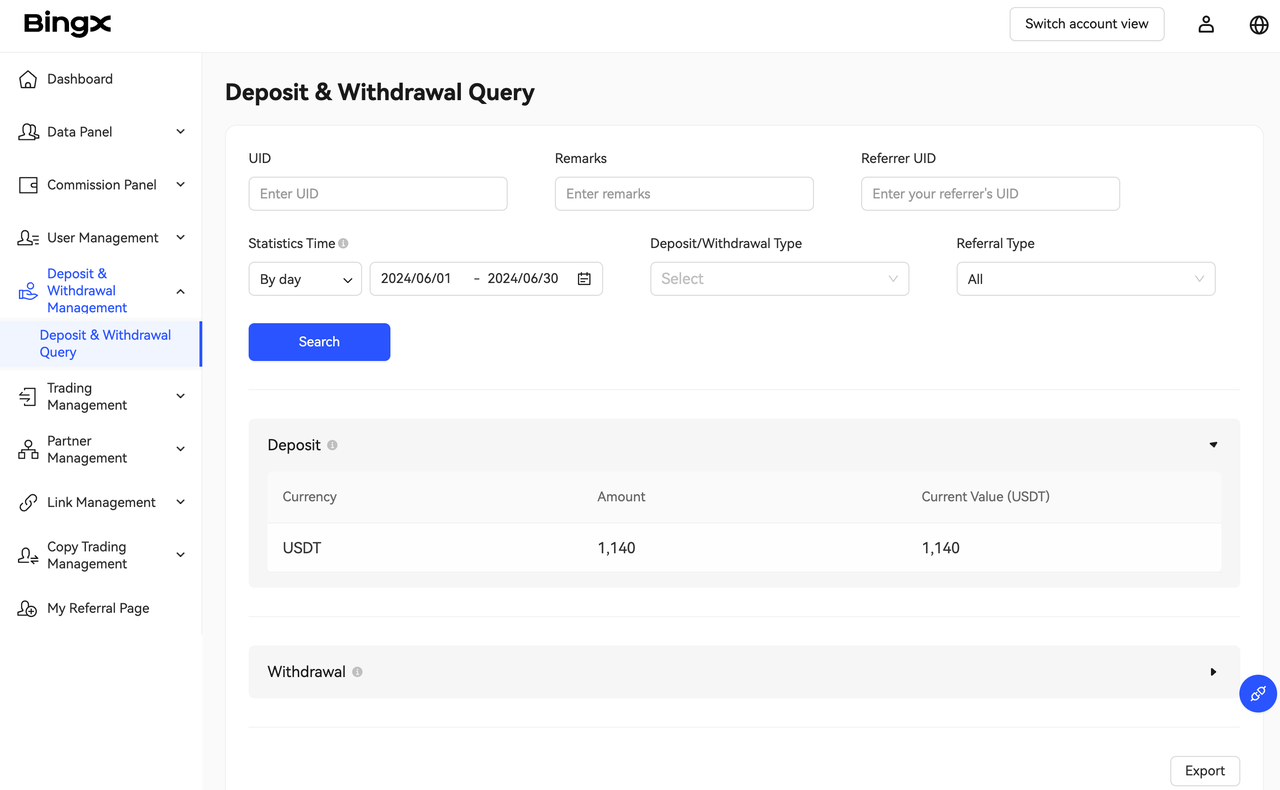
4.2 How to check the commission amount, trading volume, and number of trading users of my lower-level partners?
Visit "Partner Management" - "Partner Data", enter info such as the UID, account, remarks, statistics time, referrer type, trading volume range, or business type to query specific information about the partner (partner level should be LV2 or above).
Once you locate the specified partner, click "View Details" to access their detailed data page and check the required information.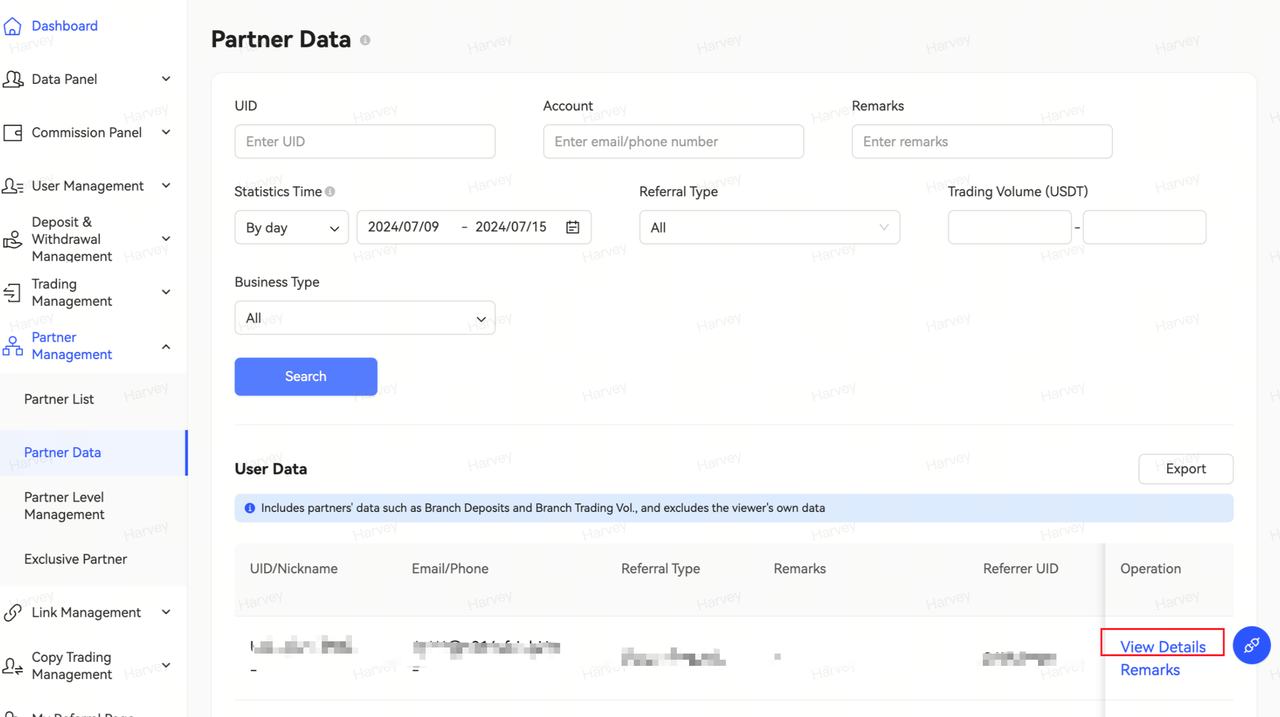
4.3 How to check users' related information?
Visit "User Management" - "Users' Basic Information", enter info such as the user UID, account, remarks, linked referral code, user's own referral code, total assets, referral type, or signed up time. This allows you to quickly locate a specific user and view details such as the user's UID, referral type, referrer's UID, referral code, user level, commission ratio, VIP level, current benefit | ratio, benefit expiration, signed up time, region, KYC status, bonus usage, first deposit, and total assets. Click the "Export" button to download the data.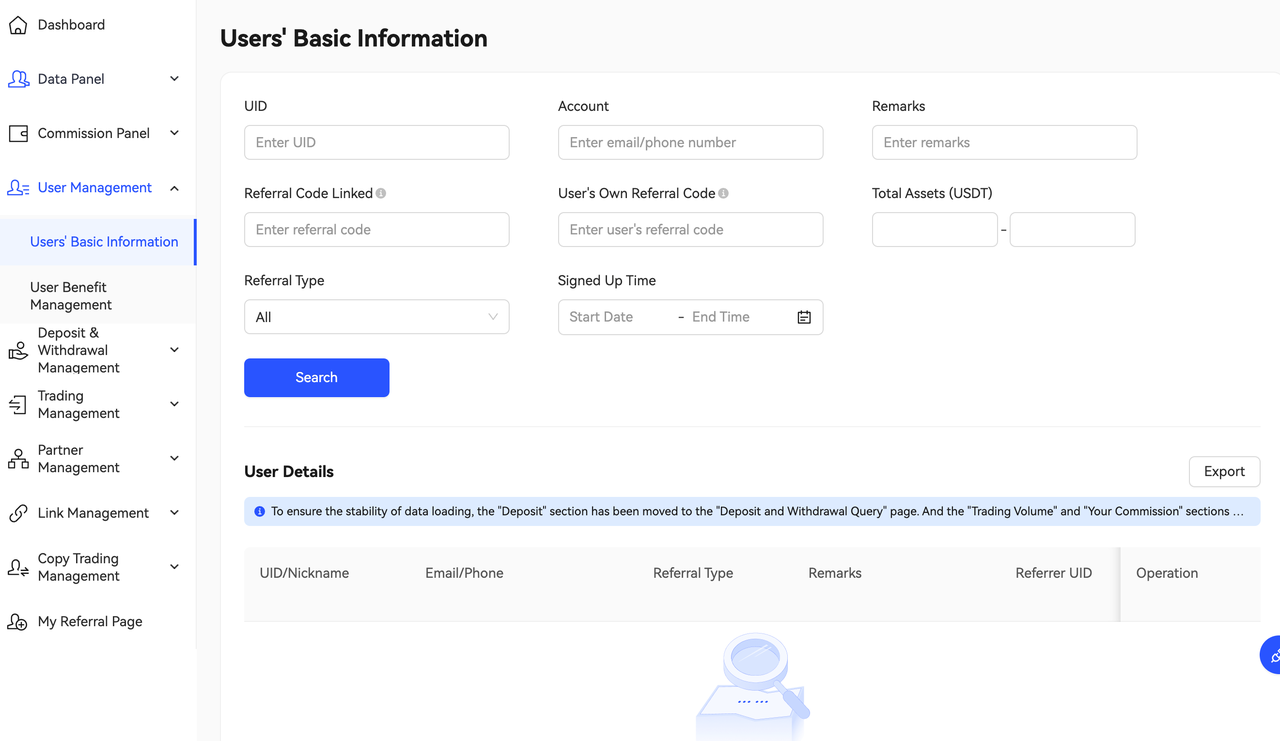
4.4 How to check branch trading volume?
- Visit "Commission Panel" - "Branch Query", filter by trade time, branch UID, remarks, referrer's commission ratio range, or business type to quickly query the commission data and performance for a specific branch. As shown in the figure below, the "Branch Commission Details" includes detailed trading volume data for your reference. Click "Export" to download the data.
4.5 Commission FAQs
4.5.1 Commission payout time
The trading fees generated by your referees between 00:00 and 24:00 (UTC+8) today will be issued to your Fund Account between 00:00 and 03:00 (UTC+8) the following day.
4.5.2 What are user commission and branch commission?
- User commission: A portion of the trading fees from a single user's trading volume that is taken as your commission.
- Branch commission: A portion of the trading fees from the trading volume of a partner's branch (i.e., all referees of the partner, excluding the partner themselves) is taken as your commission.
4.5.3 Query commission payout details
The commission you receive will be in the same currency as the trading fees generated by your referees. You can view the information in "Commission Panel" - "Commission Query". Filter by trading user UID, trade time, business type or currency for your query.
- Commission Composition: Includes information on settlement currency, amount, value, etc.
- Distribution Details: Includes information on trading user UID, business type, subtype, currency, amount, value, trade time, issuance time, etc.
4.5.4 How are commissions calculated
Commissions are earned progressively from the closest referral relationship where the trading fees are generated.
Example
Let's assume the commission ratio and referral relationship are as shown in the diagram, where A --> B represents A referred B:
A (Commission Ratio 40%) --> B (Commission Ratio 30%) --> C (Trading User Who Generated 100 USDT Trading Fee)
C trades and generated a 100 USDT trading fee.
Then, B will get: 100 x 30% = 30 USDT; while A will get 100 x (40% - 30%) = 10 USDT.
4.5.5 How is my commission calculated when I have set up a "Perpetual Futures Trading Fee Discount" benefit for new users?
Commissions are calculated based on the actual trading fees generated by the new users. If they benefit from a fee discount, the commissions are calculated on the actual trading fees after discount.
Example
Let's assume the commission ratio and referral relationship are as shown in the diagram, where A --> B represents A referred B:
A (Commission Ratio 40%) --> B (Perpetual Futures Trading Fee Discount 10%)
If B trades Perpetual Futures, the original expected trading fee was 100 USDT; since B enjoys a 10% fee discount, the actual trading fee generated is 90 USDT.
Then, A can earn a commission of: 90 USDT x 40% = 36 USDT
4.5.6 How is my commission calculated when I have set up a "Trading Fee Rebate" benefit for new users?
“Trading Fee Rebate” means that users can receive a certain percentage of their trading fees as a rebate. Therefore, this amount of rebate will not be counted towards my commission.
Example
Let's assume the commission ratio and referral relationship are as shown in the diagram, where A --> B represents A referred B:
A (Commission Ratio 40%) --> B (Trading Fee Rebate 10%)
B generates 100 USDT in trading fees and has a trading fee rebate of 10%.
Therefore, B can get a rebate of: 100 x 10% = 10 USDT.
And A's Commission: 100 x (40% - 10%) = 30 USDT
4.5.7 How are indirect referral commissions calculated?
Indirect Referral Commission = Actual Paid Trading Fees * (Your Commission Ratio - The Commission Ratio of Your Closest Partner)
Example
Let's assume the users' commission ratio and referral relationships are as follows, where "A --> B" means A referred B:
A (40% Commission Ratio) -->B (30% Commission Ratio)-->C (20% Commission Ratio)
C trades and generates an actual trading fee of 100 USDT.
B's commission: 100 x 30% = 30 USDT
A's commission: 100 x (40% - 30%) = 10 USDT
4.5.8 How can I increase my level and commission ratio?
Natural Upgrade: You can upgrade by inviting valid users within a specified period.
Period: Each period consists of every two weeks
Valid Users: Refers to referees who have completed a deposit and a futures trading volume > 1,000 USDT within the current period.
The number of valid users required for each level is as follows:
Level |
Valid Users |
LV0 |
0 |
LV1 |
0 |
LV2 |
10 |
LV3 |
25 |
LV4 |
60 |
LV5 |
140 |
LV6 |
280 |
LV7 |
450 |
5. Same-Level Partner Commissions
Announcement: Rule Adjustment of Same-Level Commissions
When your upper-level partner's commission ratio is ≤ your commission ratio:
1. Your upper-level partner will receive an additional 2.5% commission ratio, while your commission ratio will be reduced by 2.5%.
2. Specifically, if you're getting a commission ratio of ≤ 5% from a branch under a direct referee, you and your upper-level partner will split that portion of branch commission equally.
Let's assume the commission ratio and referral relationship are as shown in the diagram, where A --> B represents A referred B:
Example 1A (Commission Ratio 35%) --> B (Commission Ratio 40%) --> C (Trading User)C generates 100 USDT in trading fees, and A's commission ratio is ≤ B.The commission will be distributed as follows:B's Commission: 100 x (40% - 2.5%) = 37.5 USDTA's Same-Level Commission: 100 x 2.5% = 2.5 USDT
Example 2A (Commission Ratio 35%) --> B (Commission Ratio 40%) --> C (Commission Ratio 38%) --> D (Trading User)D generates 100 USDT in trading fees. As A's commission ratio is ≤ B, and B's commission ratio - C's commission ratio = 2% < 5%. Hence, B and A will split the commissions earned from D equally.The commission will be distributed as follows:C's Commission: 100 x 38% = 38 USDTB's Commission: 100 x (40% - 38%) ÷ 2 = 1 USDTA's Same Level Commission: 100 x (40% - 38%) ÷ 2 = 1 USDT

